
During a season, your DJI Agras drone performs a lot of work, which, just like for a human, can be really taxing for its components after some time. To ensure it can always do your tasks with utmost efficiency and finish them without any problems or unexpected setbacks, which might cost a lot, regular maintenance and care must be performed.
In this blog post, we will cover all essential steps you can take yourself to ensure your DJI Agras is always ready for whatever awaits it. Please note, that most of the listed maintenance tasks must be performed annually, unless specified otherwise.
Spraying System
Hoses, Spray Tank, Hose Connector
- After completing the daily operations, fill a container with clean water to begin spraying and cleaning the spraying system. If not done, leftover chemicals may block the spraying system.
- Physically check for any loose connections at multiple hose connectors, visually inspecting them for cracks or leakage at sealing points. If any damage is found, replace them as soon as possible
Delivery Pump, Centrifugal Sprinkler, Filter & Liquid Level Gauge, Flow Meter, Weight Sensor
- Remove pump cover, impeller pump, and isolation sleeve, inspecting for broken shaft, wear, or melting. Check pump motor port for corrosion.
- For centrifugal sprinkler, check if the spinner disk is mounted correctly and isn’t loose. Check the motor lower cover for wear, and the motor port (after removing the cable) for any signs of corrosion.
- Clean and inspect flow meter for corrosion and verify proper power/functionality.
- After draining the spray tank, check the filter for blockage, liquid level gauge for any dirt, connector looseness, or damage.
- Check if the solenoid valve can be opened normally and is not blocked by debris.
- (T50/T25) Inspect all three weight sensors that are located under the spray tank for any signs of cable damage. If the weight sensors are wet at the top or at the bottom, check the spots where the spray tank touches the weight sensors when installed. If there is leakage, it is recommended to replace the spray tank.
Propulsion System
Motor, Propellers, Propeller Adapters
- Check propellers for looseness: hold the end of the propeller and move it up and down. If the looseness is noticeable, remove the propeller clamp and check for wear.
- Inspect for damage (misshapen/broken blades or damaged propeller adapter). It is recommended to replace propeller gaskets after the season.
- Verify if the motor rotates smoothly and without any abnormal sound, and if it’s not shaking when trying to tilt it. Check the motor cable/connector for breaks/cracks. Clean any pesticide/fertilizer residue on a motor with a wipe, not a high-pressure washer.
ESC, Aircraft Arm
- Inspect the ESC module for corrosion and verify it powers on and functions correctly.
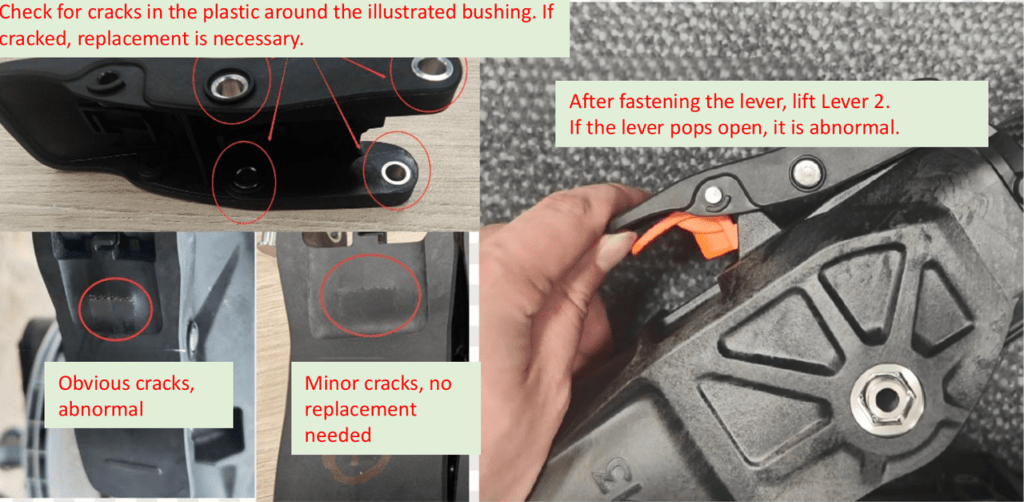
- Check aircraft arm folding mechanism for looseness/excessive gaps while folding/unfolding after unlocking the arm lever.
- Lock Lever (T100): Check if it is misshapen or cracked. Make sure to fully unfold the arm before trying to lock it, as it may crack the lever.
Aircraft Structure Part
Frames, Landing Gear, Cables
- Inspect aircraft arm connectors for cracks/misshaping.
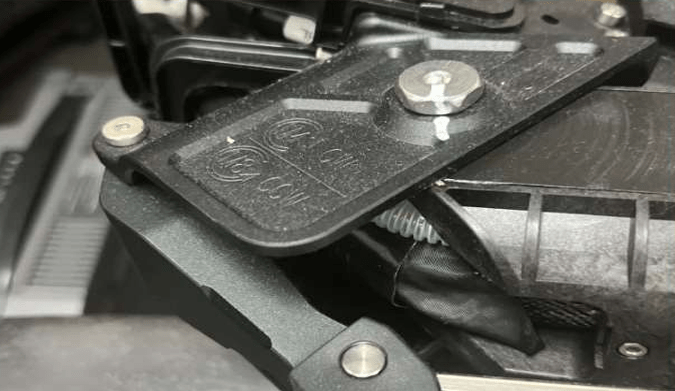
- Check if the drone battery is sliding normally when inserting.
- Gently shake front/rear frames and landing gear, checking for any looseness/displacement, and inspect for cracks/breaks.
- Slightly pull the rear radar to check if the radar brackets are mounted correctly and are not loose. Ensure cables are not interfering with each other, excessively bent (replace if severely bent), broken, or loose. Verify cable connector sealing rings are in place and not misshapen.
Vision Sensors, Camera
- Check if the camera is clean and it is able to rotate normally.
- Check if vision sensors are clean, as dirt may cause interference during flight.
Power Board
- For the power board, make sure to keep it clean and dry to avoid corrosion. Check if the board is not loose, as liquid may damage the bottom side if the board is not secured tight enough. If there are signs of oxidation, use a cleaning spray for contacts and clean it.
Positioning and Radar Systems
SDR Antenna, RTK Module, Front/Rear Radar
- Visually inspect for any signs of corrosion and if the devices are powering on and functioning properly.
- Check radars for any signs of cosmetic defects, such as dents.
LiDAR (Agras T100)
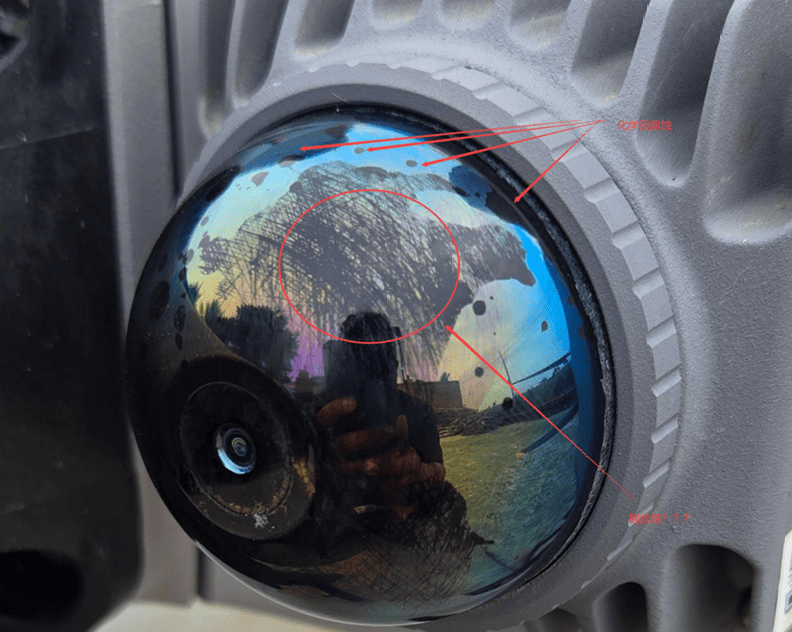
Before and after work, check if the laser radar dome is contaminated with pesticides, fertilizers, or dust. It may cause laser radar malfunction. It is recommended to:
- First rinse with clean water (do NOT use chemical agents), then use a compressed air cleaner to spray the parts of the window that need cleaning, and finally wipe the window with a clean, lint-free cloth or tissue. (Direct wiping when there is granular dust and other impurities on the LiDAR may cause scratches, affecting the performance of the laser rangefinder.)
- If the dome still has visible dirt, use a cleaning cloth with a small amount of alcohol to gently wipe it.
In case there are problems with your drone
If during the maintenance tasks you have noticed that there is a problem with some components of your drone, or, in worse case scenario, the drone crash has occurred, make sure to complete the following steps:
- Prepare photos and videos of errors/broken components.
- Complete the following service form (click HERE!)
After completing the form, you will be contacted once our team analyzes the case.
Authorised service address for DJI Agras drones: https://www.enterra.sk/en/our-contacts/
Conclusion
Maintaining the drone is an essential task which prolongs its service life, to ensure it can be used for a long time and perform any work you give it with utmost efficiency. If there are any issues while performing the maintenance tasks, please contact us.